For BCBAs and behaviour support teams

Build a practice routine the whole support team can follow.

Choose cognitive activities that fit the learner’s goals, coach the caregiver through the routine, and see what was practised before your next session.

Free for your first 5 active clients each month. No credit card needed.
Neurofit in practice
Neurofit activity assignment and completion record
One assignment routine for the learner, caregiver and team.

Our clinical community

Playful Strides Therapy
Healing Synergy
WinnMed
The Note Ninjas
Beyond The DoorBeyond The Door

Clients keep practising

client engagement across Neurofit programs

The work adds up

activity sessions completed in clinic, over video and at home

A clearer way to follow practice

Does everyone know the next practice step?

Paper home programs and screen-shared worksheets weren't built to show you what happens between visits.

Too much to coordinate

The BCBA, session team and caregiver need a shared routine they can follow.

Hard to start at home

Families need to see how an activity works before practising it between sessions.

Completion needs context

A finished activity does not tell you what help, prompting or support was involved.

Goals keep changing

A learner’s interests, capacity and support needs can change from one session to the next.

A connected workflow

See where Neurofit fits.

Use Neurofit for complementary attention, memory and planning practice when it fits the learner’s program. Keep behavioural targets, prompting and generalization measures in your behaviour-data system.

In the session

Choose practice around the learner

Match an attention, memory or planning activity to a goal in the existing program. Try it together before making it part of the routine.
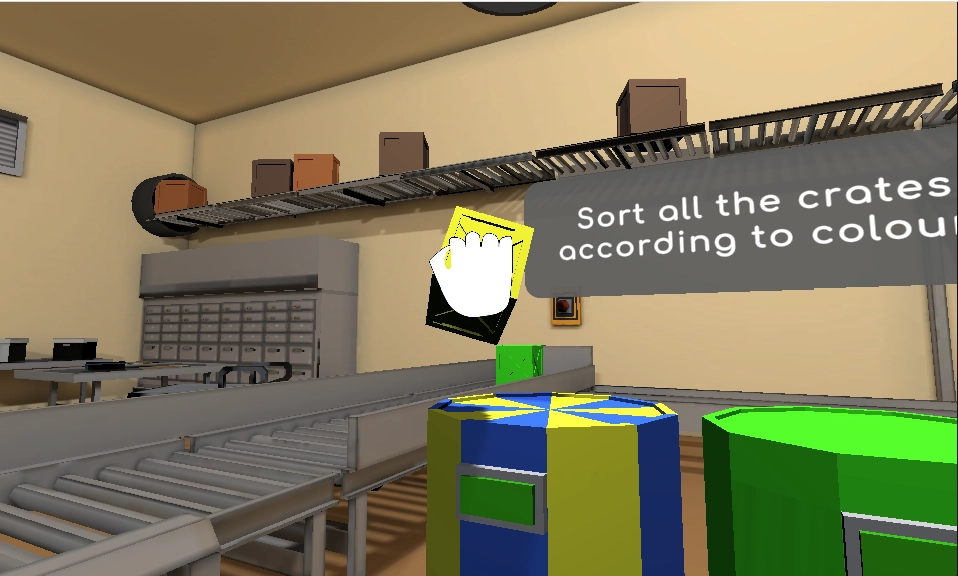
  • Demonstrate the activity in person or alongside a video call
  • Adjust the activity and level to the learner
  • Use your observations to decide what is suitable
Take the product tour
Cognitive activity on the client’s screen
Choose a goal. Practise together.

Between visits

Coach the caregiver through a clear routine

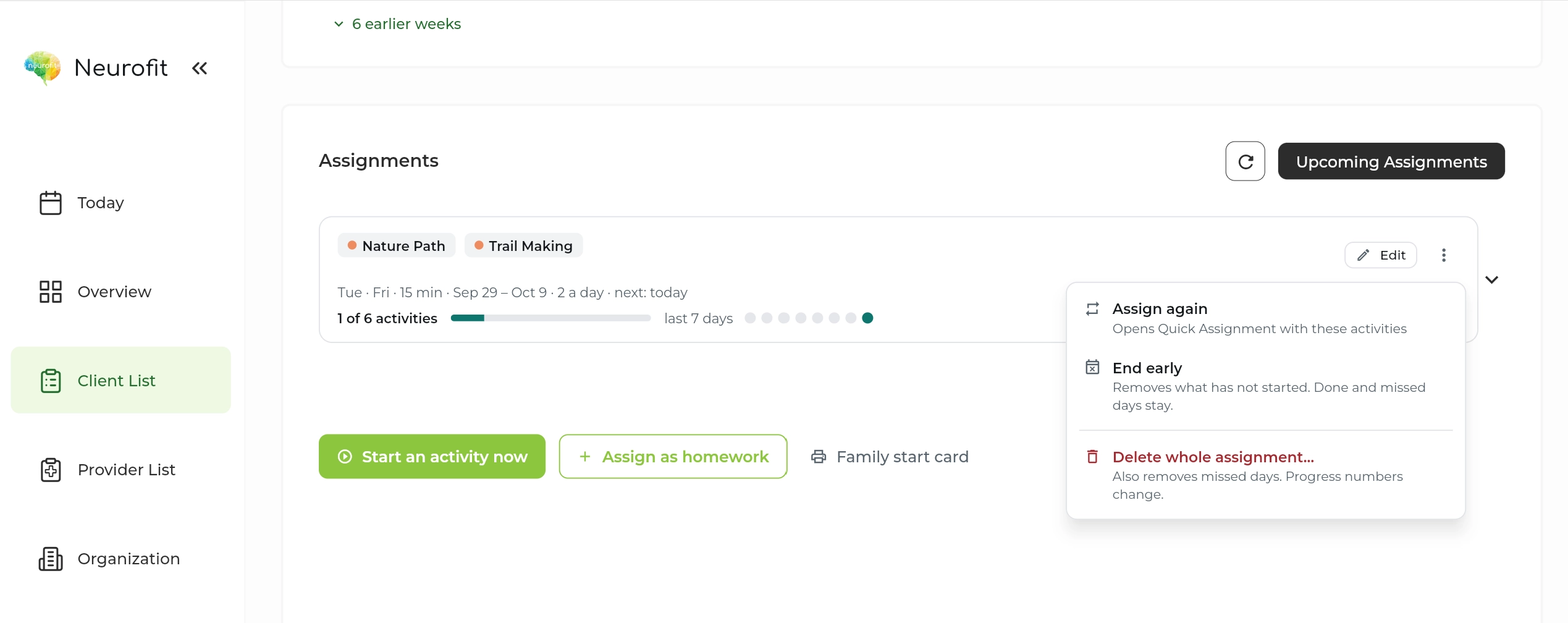
Turn the practice step into a home assignment. Agree how the caregiver will support it, then use the completion record to start your next conversation.

  • Choose activities and a manageable schedule
  • Let families return to the same assigned activities
  • Ask about support, prompting and barriers alongside the record
Take the product tour
Neurofit assignment schedule and completion
A clear next step at home.

At review

Bring the practice record to program review

Look at task performance and check-ins alongside your behaviour data. Use that combined context to decide whether to continue, adapt or change the practice routine.

  • Review accuracy and decision time within the same activity level
  • Discuss engagement with the learner and caregiver
  • Collaborate with other providers on Pro
Take the product tour
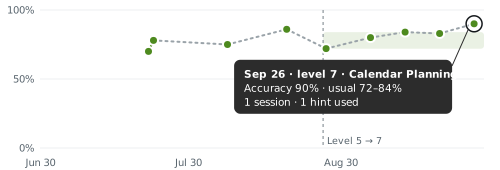
Calendar PlanningLatest · Sep 26

Accuracy

Tasks finished correctly

90%
Accuracy chart with session-day points, an activity-level change, a shaded usual range, and a latest value of 90 percent

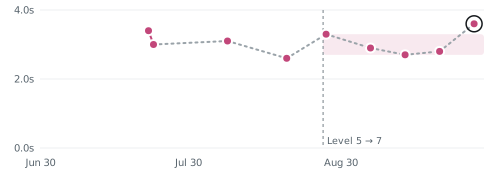
Decision time

Average seconds per move

3.6s
Decision-time chart with pink session-day points, a shaded usual range, an activity-level change, and a latest value of 3.6 seconds

Shading shows the usual range at this level.

Review the record in context.

Get up and running

A small first step.

A minute to start

Set up your first client in a minute.

No training needed

Choose an activity and a schedule in the clinician dashboard.

Help if you want it

Book a walkthrough with our team for your questions.

Privacy built into the workflow

Client data, handled with care.

Built in Canada to support clinicians around the world.

Built for health privacy law

PIPEDA, PHIPA and, where applicable, HIPAA.

Encrypted

In transit and at rest, with access controls and regular security assessments.

BAA on request

For US providers covered by HIPAA.

How we protect client data

Common questions

What teams ask us.

Where does Neurofit fit in an ABA program?
A BCBA or qualified provider can select cognitive activities that complement the learner’s goals. Use them to support an agreed practice routine; assess their relevance and interpret results within your broader program.
What can caregivers do at home?
Open the learner’s assigned activities in a supported desktop browser and help with the routine you have demonstrated. Review completed practice with the caregiver and discuss any support, prompting or barriers that affected the session.
Does an activity score show generalization?
An activity score describes performance on that task. Use direct observation and your existing measures to evaluate skills in everyday settings.
Can more than one provider follow the learner?
Pro supports multiple providers. Your team can review the activity record and plan the next practice step together.
How do we try it with a learner?
Start with a goal, try an activity together and check whether it is suitable before assigning it at home. Starter is free for up to 5 active clients per month.
Is it available in French?
Yes. Neurofit activities are available in English and French.
Do clients need to download anything?
No. Activities run in a web browser on a laptop or desktop with a mouse and an internet connection. Phones and tablets are not supported yet.

Get started

See where cognitive practice fits your program.

Set up your first client in a minute. No training needed.

Free for your first 5 active clients each month.