Return to work after burnout

Bring cognitive practice into a gradual return.

When energy, appointments and work demands change from week to week, it can be hard to keep a consistent record of practice.

Free for your first 5 active clients each month. No credit card needed.

Neurofit in practice
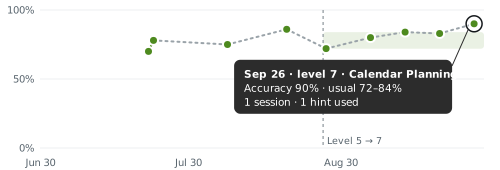
Calendar PlanningLatest · Sep 26

Accuracy

Tasks finished correctly

90%
Accuracy chart with session-day points, an activity-level change, a shaded usual range, and a latest value of 90 percent

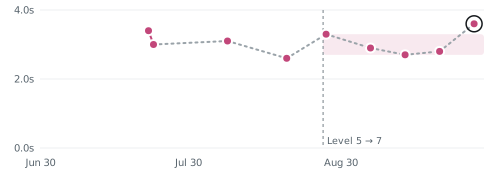
Decision time

Average seconds per move

3.6s
Decision-time chart with pink session-day points, a shaded usual range, an activity-level change, and a latest value of 3.6 seconds

Shading shows the usual range at this level.

Read task performance alongside the wider plan.

Clients keep practising

client engagement across Neurofit programs

The work adds up

activity sessions completed in clinic, over video and at home

A clearer way to follow practice

Is the time between reviews a blind spot?

Paper home programs and screen-shared worksheets weren't built to show you what happens between visits.

No regular record

Short activities can give the team a consistent starting point for review.

No space to pace

Practice needs to fit energy, appointments and the wider plan.

No shared context

The person and treating team need to agree how information is used.

No single answer

A task score cannot make a return-to-work decision on its own.

A connected workflow

See where Neurofit fits.

Use the activity record to support the conversation, alongside clinical judgment and the wider care plan.

In the session

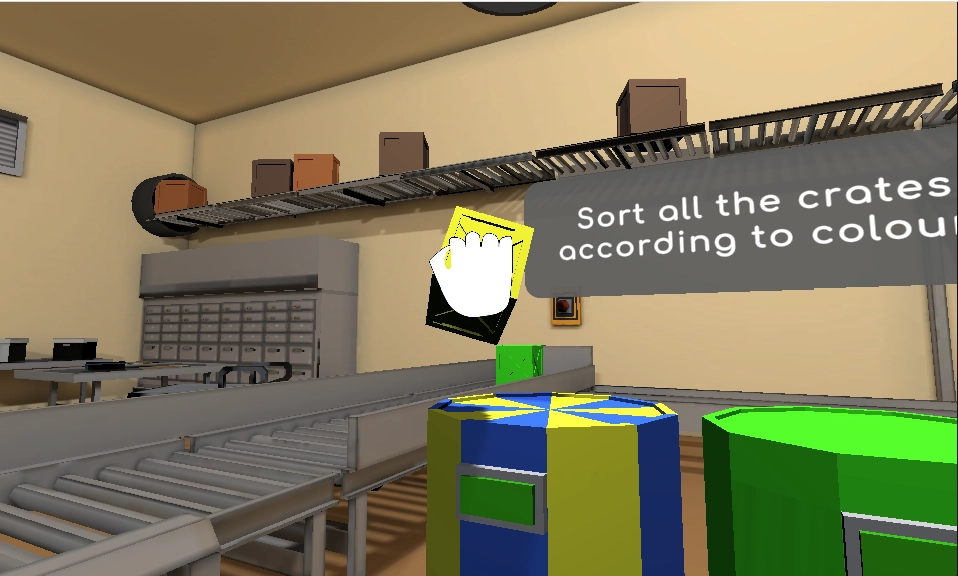
Start with an appropriate activity

The treating team chooses cognitive practice around the person’s goals and current capacity.
  • Choose attention, memory or planning activities
  • Practise in a supported desktop browser
  • Keep pacing and support in the clinical conversation
Take the product tour
Cognitive activity on the client’s screen
Choose a goal. Practise together.

Between visits

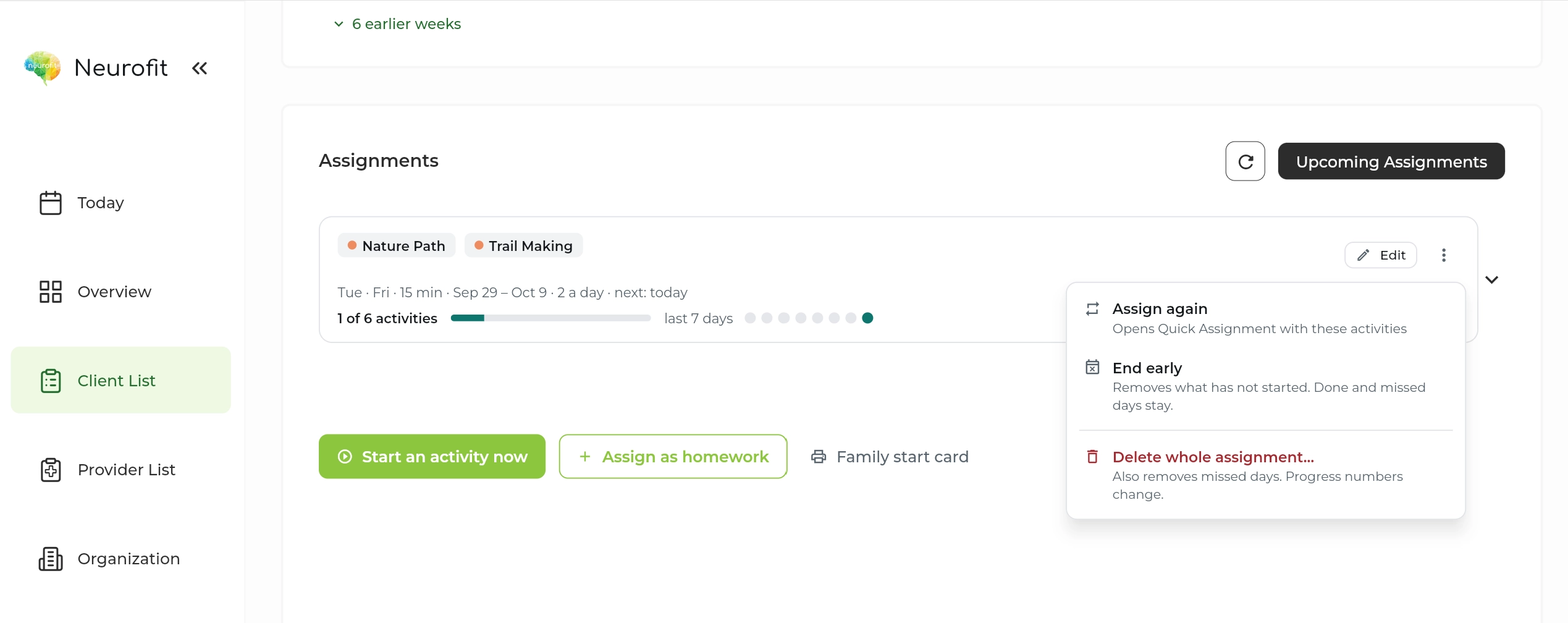
Keep the schedule manageable

Review short, regular practice alongside the person’s existing care and work schedule.
  • Assign a home schedule
  • Review completion over time
  • Adjust the next step with the treating team
Take the product tour
Neurofit assignment schedule and completion
A clear next step at home.

At review

Discuss the record together

Use task measures and check-ins to support questions about the next step.

  • Compare sessions at the same level
  • Keep the claimant’s agreement central to sharing
  • Prepare reports and letters on Pro
Take the product tour
Calendar PlanningLatest · Sep 26

Accuracy

Tasks finished correctly

90%
Accuracy chart with session-day points, an activity-level change, a shaded usual range, and a latest value of 90 percent

Decision time

Average seconds per move

3.6s
Decision-time chart with pink session-day points, a shaded usual range, an activity-level change, and a latest value of 3.6 seconds

Shading shows the usual range at this level.

Review the record in context.

An anonymised program example

A return to work after burnout

A client on leave for burnout started with five minutes of Neurofit a day, alongside a wider care plan. Three months later, they began a graduated return and subsequently returned to full-time work, with no relapse reported.

Shared by a Canadian disability management organization’s clinical services team. Details anonymised.

Use alongside clinical judgment and formal return-to-work assessments.

Get up and running

A small first step.

A minute to start

Set up your first client in a minute.

No training needed

Choose an activity and a schedule in the clinician dashboard.

Help if you want it

Book a walkthrough with our team for your questions.

Privacy built into the workflow

Client data, handled with care.

Built in Canada to support clinicians around the world.

Built for health privacy law

PIPEDA, PHIPA and, where applicable, HIPAA.

Encrypted

In transit and at rest, with access controls and regular security assessments.

BAA on request

For US providers covered by HIPAA.

How we protect client data

Common questions

What teams ask us.

Does Neurofit decide fitness for work?
No. It supports cognitive practice and review. Fitness-to-work and functional assessments remain with the appropriate clinical and occupational team.
How much practice should someone do?
The treating team should choose an appropriate schedule. The five-minute routine in the anonymised story is one person’s experience, not a general prescription.
Can practice fit around a gradual return?
The clinician can set a schedule and review completed activity alongside the wider care and work plan.
Who can see the activity record?
Progress is shared with the person’s agreement and through the appropriate consent and care workflow.
Does the case story predict someone else’s result?
No. It is one person’s experience, not a typical outcome or evidence that Neurofit caused the return to work.
Can we review the reporting options first?
Yes. Explore the reporting page and fictional samples, or book a walkthrough for your team.
Is it available in French?
Yes. Neurofit activities are available in English and French.
Do clients need to download anything?
No. Activities run in a web browser on a laptop or desktop with a mouse and an internet connection. Phones and tablets are not supported yet.

Get started

Discuss a connected return-to-work workflow.

Set up your first client in a minute. No training needed.

Free for your first 5 active clients each month.